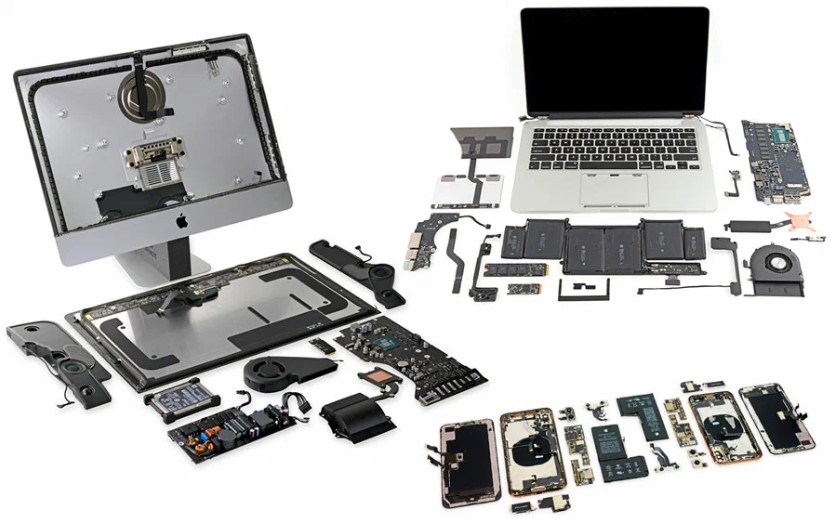
In the dynamic, rain-splashed rhythm of Manchester, our devices are the lifelines of our daily existence. They are our offices in coffee shops on King Street, our entertainment on trams to MediaCity, and our connection to family worldwide. When your iPhone screen fractures on the cobbles of the Northern Quarter, your MacBook Air refuses to start before a University project deadline, or your gaming PC stutters mid-session, the disruption is profoundly personal and professional. The immediate question isn't just "how to fix it," but "where can I find a single, trustworthy expert to fix everything?" The answer lies in the emerging powerhouse of local service: the integrated one-stop technology repair centre. This comprehensive guide delves deep into why this model is revolutionising tech support for Manchester residents and businesses, providing an exhaustive analysis of services, critical evaluation criteria, and a clear comparison to help you make the most informed decision for your essential devices.
The Manchester Tech Reality: A Multi-Device Ecosystem Demands an Integrated Solution
The modern Mancunian manages a portfolio of digital devices. You might draft emails on a Windows laptop in a co-working space, take client calls on your iPhone 15 Pro, sketch ideas on an iPad Pro, and edit video on a powerful desktop computer at home. Each device is a specialist tool, and a failure in any one creates a cascading disruption. The traditional repair landscape—fragmented into mobile phone repair shops, Apple-only specialists, and generic PC support—forces you into the role of a project manager, coordinating between multiple vendors with varying standards, warranties, and expertise. This is not just inconvenient; it’s inefficient and risky.
- The Core Problem of Fragmented Repair: Specialised shops have deep but narrow knowledge. A mobile repair kiosk might excel at screen replacements but lack the diagnostic tools for a MacBook logic board issue. Conversely, a computer store may be baffled by iPad display calibration. This siloed approach often leads to misdiagnosis, longer cumulative downtime, and the hassle of managing multiple service relationships and warranties.
- The Integrated Advantage of a One-Stop Hub: A true one-stop tech repair specialist in Manchester acts as your single point of contact and accountability. They possess a holistic understanding of how your devices interact within the Apple ecosystem or a Windows environment. This unified expertise allows for faster, more accurate diagnosis (is it the laptop's WiFi card or the router configuration?), streamlined logistics (you drop all malfunctioning devices at one location), and consistent quality standards across all repairs. It’s the seamless, efficient solution that a tech-centric city deserves.
A Deep Dive into the Service Portfolio of a Premier Manchester Repair Centre
A top-tier Manchester computer and device repair hub is not a jack-of-all-trades but a master of many. Its service menu reflects the complex needs of the local populace, from students to entrepreneurs. Let’s dissect the core offerings in granular detail.
1. Mobile & iPhone Repairs: Micro-Surgery for Your Essential Companion
- Display & Screen Replacement:
- Process: Beyond simple glass swap, modern phones like the iPhone 14 and Samsung Galaxy S23 use fused displays where the glass, digitizer, and OLED panel are laminated. Professional repair involves meticulous separation using heated beds and specialised tools to avoid damaging the underlying OLED screen. Post-installation, colour calibration and True Tone functionality (for iPhones) must be restored using proprietary software tools, a step often missed by non-specialists.
- Part Quality: The critical differentiator. Low-cost aftermarket LCD screens offer poor colour accuracy, brightness, and power efficiency. Premium services use OEM-grade or original recycled displays, ensuring waterproofing seals (IP68 rating) are maintained and that features like 120Hz ProMotion refresh rates on iPhone Pros remain functional.
- Battery Service & Power Management:
- Beyond Swap: A professional service doesn’t just install a new battery. They run full diagnostic software (like Apple’s AST2 or 3uTools) to check for power management IC (PMIC) health. They calibrate the new battery by performing a full charge-discharge cycle and resetting the battery cycle count in the device's firmware where possible, ensuring the OS reports accurate battery health percentages.
- Safety: Using non-certified batteries can pose fire risks. Reputable centres source from certified distributors, ensuring cells meet safety standards.
- Liquid Damage Remediation:
- Immediate Action: The advice is always power off immediately. A professional liquid damage repair starts with an ultrasonic cleaner to remove corrosion from the logic board using high-frequency sound waves in a specialised solution.
- Corrosion Tracing & Microsoldering: Technicians then inspect under a microscope, using schematics to trace corroded data and power lines. Microsoldering is used to repair or bypass damaged capacitors, resistors, and IC chips. This is a high-skill repair that differentiates experts from part-swappers.
- Advanced Logic Board & Data Recovery:
- For devices that won’t power on post-liquid damage or drop, board-level repair is key. This can involve reballing or replacing the NAND flash memory chip (where data is stored) or the CPU. In catastrophic cases, dedicated data recovery equipment may be used to attempt a direct read from the memory chip—a last-resort, highly specialised procedure.
2. Laptop & MacBook Repairs: Sustaining Your Primary Productivity Engine
- Component-Level Logic Board Repair:
- This is the pinnacle of laptop repair expertise. Common issues include failed USB-C power delivery controllers (preventing charging), damaged GPU or CPU power rails (causing no display), and corrosion from spills. Using schematic diagrams and boardview files, technicians use hot air rework stations and precision soldering irons to replace tiny BGA (Ball Grid Array) chips. This repair can save a £2000 MacBook Pro for a fraction of the replacement cost.
- Display Assembly & Backlight Repair:
- For MacBook Air screen cracks or laptop LCD issues, the entire display assembly is often replaced. However, a dim or flickering screen might only have a faulty backlight LED or a broken backlight flex cable. A skilled technician can diagnose this and perform the more economical backlight replacement, avoiding the cost of a full assembly.
- Comprehensive Thermal Management:
- Overheating in laptops like the Dell XPS or MacBook Pro is a performance killer. A deep clean involves disassembling the cooling system, removing dust from heatsinks and fan blades, and—critically—replacing the dried-out thermal interface material (TIM) on the CPU and GPU with high-performance thermal paste or thermal pads. This can lower operating temperatures by 10-20°C, restoring performance and longevity.
- Data Migration & SSD Upgrades:
- Upgrading to a Solid State Drive (SSD) is the most effective performance upgrade. A professional service will not only physically install the NVMe or SATA SSD but also clone your existing operating system, applications, and files bit-for-bit from the old drive, ensuring a seamless transition with no reinstallation hassle.
Place Your Reapring Order Here At IT Cube - Best Device Repair in Manchester
3. Desktop Computers & Bespoke Systems: Powering Creativity and Play
- Diagnostic Bench Testing: For desktop PCs, issues are isolated by component substitution on a test bench. A faulty Power Supply Unit (PSU) is diagnosed with a PSU tester, a GPU issue by testing in a known-good system, and RAM problems with utilities like MemTest86.
- Custom PC Building & Optimisation: Beyond assembly, expert building involves cable management for optimal airflow, BIOS/UEFI configuration for RAM XMP profiles and CPU overclocking, and software configuration including OS installation, driver updates, and bloatware removal.
- Advanced Troubleshooting: Issues like random blue screens can stem from faulty motherboard voltage regulators, incompatible driver conflicts, or even failing RAM modules. Systematic elimination is required, leveraging both hardware tools and software logs.
The Hallmarks of a Trustworthy Manchester Repair Service: Beyond the Basics
Any shop can claim to be a reliable repair centre. But the best in Manchester distinguish themselves through tangible practices that build customer trust and ensure service excellence.
- Transparent Diagnostics & Free Estimates: The process should start with a clear, no-obligation diagnostic assessment. You should receive a detailed explanation of the problem, the required repair procedure, and a fixed-price quote before any work begins.
- Quality Parts & Warranty Coverage: Insist on high-quality components. For Apple device repairs, this often means using original or OEM-standard parts. All repairs should be backed by a robust service warranty (e.g., 6-12 months on parts and labour).
- Data Security & Privacy Assurance: Your data is priceless. A reputable shop will have clear data privacy policies, offer data backup services before a repair where possible, and never access personal information unnecessarily.
- Skilled & Certified Technicians: Look for evidence of ongoing training. Technicians skilled in microsoldering techniques and certified in Apple and Dell hardware service have the proven competence for complex repairs.
- Speed & Turnaround Time: While quality can’t be rushed, a good shop understands urgency. They should provide realistic repair timeframes, from same-day fixes for simple screen swaps to a few days for intricate logic board repairs.
Why "One-Stop" Matters: The Integrated Benefits for You
Choosing a comprehensive device repair specialist offers layered benefits that go beyond a simple fix:
- Unified Expertise: A technician who understands both iOS and Windows ecosystems can often solve cross-platform syncing or connectivity issues you face between your devices.
- Cost-Effective Loyalty: Regular customers may benefit from discounted service rates or priority booking for multiple devices.
- Accurate Diagnostics: With broad knowledge, a technician is less likely to misdiagnose a problem. A device issue that seems like hardware failure might be a software glitch, and vice-versa.
- Future-Proof Advice: They can provide informed advice on whether a repair is economical, recommend preventative maintenance, or suggest sensible upgrade paths for all your devices.
Conclusion: Your Manchester Tech Lifeline Awaits
In a world of increasing technological dependency, your local tech repair shop transforms from a mere service provider to an essential community lifeline. For anyone living, working, or studying in Greater Manchester, from the Northern Quarter to Altrincham, having a single, dependable destination for phone, tablet, laptop, and computer repairs is not just convenient—it’s a strategic advantage.
It’s the peace of mind that comes from knowing that whether you’ve suffered a catastrophic smartphone screen damage, a frustrating laptop hardware fault, or a perplexing computer software issue, the solution is just around the corner. A premier Manchester-based repair centre embodies the principles of demonstrating Experience with every device they handle, Expertise in their technical solutions, Authoritativeness as the local go-to experts, and Trustworthiness through transparent, guarantee-backed service.
Don’t let a malfunctioning device disrupt your Manchester life. Seek out your local one-stop tech repair solution today—it’s the smartest connection you’ll make.
FAQs
1. How long does a typical screen repair take?
For a common iPhone or Android model, a professional screen replacement can often be completed in 60-90 minutes as a while-you-wait service, provided the correct high-quality part is in stock. For newer models with advanced displays (like iPhone 14/15 Pros or Samsung Galaxy S series) requiring calibration, or for iPads and laptops, it may take 2-4 hours due to the intricate disassembly required.
2. Will my data be safe during the repair?
A reputable centre will always prioritise data security. They should have a clear policy, often asking you to back up your data beforehand if possible. For logical software repairs, data is not touched. For hardware repairs, the risk to data is minimal but exists (e.g., a device failing during disassembly). The best shops will offer a pre-repair diagnostic backup for an additional fee if the device is functional. Always ask about their specific data privacy protocol.
3. Can you fix water-damaged devices that won’t turn on?
Yes, this is where advanced board-level repair expertise is critical. The process involves ultrasonic cleaning, microscopic inspection, and microsoldering to repair corrosion damage to the logic board. Success is not guaranteed and depends on the severity of the corrosion, the length of time the liquid was present, and whether power was applied while wet. An expert will provide a frank assessment after an initial inspection.
4. Is it worth repairing an older device, or should I just upgrade?
This is a key value assessment. A good technician will give you honest advice. Factors include: the cost of repair vs. replacement, the device’s performance for your needs, and its sentimental value. Often, a battery replacement or SSD upgrade can breathe 2-3 more years of life into a laptop for a fraction of a new machine's cost, making it a very economical and sustainable choice.
5. My MacBook is overheating and slow. Is this a simple fix?
Very likely, yes. This is a classic symptom of a clogged cooling system and dried-out thermal paste. A comprehensive thermal system overhaul—involving a deep clean of fans and heatsinks and reapplication of high-quality thermal compound—can often restore normal temperatures and full performance within a few hours, saving you from a costly logic board failure down the line.